

YITH Color and Label Variations for WooCommerce
YITH WooCommerce Color and Label Variations replaces the dropdown select of your variable products with Colors and Labels
3.6
(22 ratings)Will this break my store?
What the WordPress.org registry says about keeping YITH Color and Label Variations for WooCommerce running.
Tested to 7.1.2
Tested against the WordPress branch in use today.26 days ago
At least 11.2 releases a year since launch. WordPress.org only lists versions still available for download, so the real number may be higher.8.0
Your host must be running at least this version.6.9
woocommerce
These must be installed and active first.1
A single maintainer. Worth knowing if the plugin is load-bearing for your store.Maintenance & trust
Scored on how YITH Color and Label Variations for WooCommerce is looked after — not on how many stores run it.
91
out of 100Maintenance
35 / 35WordPress compatibility
20 / 20Support responsiveness
Not enough dataMerchant satisfaction
7 / 15Listing transparency
10 / 10Ratings
3.6
22 ratingsReplace the WooCommerce default select and use color swatches, images, and labels to show the options available on your products
In your e-commerce, you sell products that are available in different variations (sizes, colors, patterns, etc.); for each variation, WooCommerce inserts a “select,” which is a drop-down menu with the list of all the options selectable by users on your product pages.
This is a compromising solution for your shop aesthetics since it is not user-friendly and can be an obstacle to sales: imagine how frustrating the experience can be for a customer who has to choose the color of a T-shirt by selecting it from a list with simple texts without the visual support of color swatches.
YITH WooCommerce Color, Image & Label Variation Swatches is a plugin that allows you to replace WooCommerce selects with icons, custom images and dynamic labels. Size, color, fabric type, stone shape, buttons color, size of a necklace…regardless of the product you sell, this tool is an effective and free solution to better represent the options available for your products and offer your customers a better shopping experience.
Main features
- Create “Color swatches” attributes
- Set the color swatches size and border radius on the product page
- Create “Image” attributes
- Create “Label” attributes
- Customize the border color of options
- Show attributes on product pages
Need more? Get premium
The free version of our plugin works like a charm, but if you need a more versatile and complete solution, the premium version is what you need. Still unsure? Remember that our 30-day money-back guarantee is available on all our plugins!
With the premium version you can:
- Show attributes also on the shop, category, and other pages, not only on the product page;
- Create bicolor swatches to show two-color samples
- Override attributes global style in specific products
- Set text tooltips and/or with preview images for each attribute
- Choose whether to show the attribute description or not on the product page
- Replace the product image when hovering over the attribute
- Show the available attributes or not in the tab “Additional information” on the product page
- Show variations as separate products on the Shop page
- Customize the text of the “Add to cart” button when a variation is selected
- Set a different image gallery for each product variation
- …and much more!
Languages
Also available in:
- English
- Italian
- Spanish
- Dutch
Documentation
Please, read the official documentation of YITH Color and Label Variations for WooCommerce to learn about all the plugin features.
About YITH, the authors of this plugin
YITH is an independent company in the development and sales of WooCommerce plugins. With 15-year experience and a catalog of over 100 plugins used by nearly two and a half million users, YITH has the ambitious goal of making e-commerce usable by everyone through plugins that improve usability and extend the basic functionality of WordPress and WooCommerce.
If you have problems with our plugins or something is not working as it should, first follow this preliminary steps:
- Test the plugin with a WordPress default theme, to be sure that the error is not caused by the theme you are currently using.
- Deactivate all plugins you are using and check if the problem is still occurring.
- Ensure that you plugin version, your theme version and your WordPress and WooCommerce version (if required) are updated and that the problem you are experiencing has not already been solved in a later plugin update.
If none of the previous listed actions helps you solve the problem, then, submit a ticket in the forum and describe your problem accurately, specify WordPress and WooCommerce versions you are using and any other information that might help us solve your problem as quickly as possible.
If you are using the premium version of the plugin, we invite you ask for assistance in our support desk.
There’s no limit in the amount of attributes you may use. You can create many variations for each product using the configured attributes.
This is a known issue, which does not depend on a malfunctioning, though,, but on the fact that WooCommerce requires the chosen attribute to be deselected before another of the same type could be selected.
You can report security bugs through the Patchstack Vulnerability Disclosure Program. The Patchstack team help validate, triage and handle any security vulnerabilities. Report a security vulnerability..
Categories
Plugin details
Tags on WordPress.org
Alternatives
Other plugins in the same categories.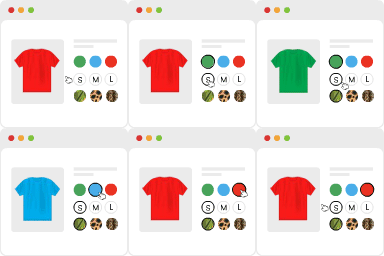
Variation Swatches for WooCommerce

Product Bundle Builder for WooCommerce


Advanced Woo Labels – Product Labels & Badges for WooCommerce

Custom Product Tabs for WooCommerce & WordPress Tabs Builder – Smart Tabs
