
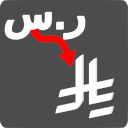
ingenidev, KSA – SAR Currency Symbol Changer مغير رمز عملة الريال السعودي
NEW Plugin! By default, WooCommerce uses the currency symbol for the Kingdom of Saudi Arabia (KSA) Riyal (SAR) as "ر.س".
Will this break my store?
What the WordPress.org registry says about keeping ingenidev, KSA – SAR Currency Symbol Changer مغير رمز عملة الريال السعودي running.
Tested to 7.0.6 — 1 branch behind 7.1
Tested against the WordPress branch in use today.5 months ago
At least 3.8 releases a year since launch. WordPress.org only lists versions still available for download, so the real number may be higher.5.2.17
Your host must be running at least this version.3.3
woocommerce
These must be installed and active first.1
A single maintainer. Worth knowing if the plugin is load-bearing for your store.Maintenance & trust
Scored on how ingenidev, KSA – SAR Currency Symbol Changer مغير رمز عملة الريال السعودي is looked after — not on how many stores run it.
Maintenance
35 / 35WordPress compatibility
20 / 20Support responsiveness
Not enough dataMerchant satisfaction
Not enough dataListing transparency
6 / 10Ratings
No one has rated this plugin on WordPress.org yet. That is a statement about the ratings page, not about the plugin — plenty of well-kept plugins never collect them.
NEW Plugin! By default, WooCommerce uses the currency symbol for the Kingdom of Saudi Arabia (KSA) Riyal (SAR) as “ر.س”. This plugin changes it to the new official symbol (issued by the KSA Central Bank on February 20th 2025). | يغير هذا المكون الإضافي رمز الريال السعودي إلى الرمز الرسمي الجديد.
How to Change the Saudi Riyal (SAR) Currency Symbol in WooCommerce?
NEW Plugin! By default, WooCommerce uses ر.س as the symbol for the Saudi Riyal (SAR), which may not always align with your website’s branding or customer preferences. If you want to replace ر.س with the new official symbol, this plugin makes the process effortless.
Why Change the SAR Symbol in WooCommerce?
Many businesses prefer displaying SAR’s official symbol instead of ر.س for better readability, consistency, and international appeal. Some common reasons include:
–Maintaining a uniform look across your website, especially when using English as the primary language.
–Enhancing clarity for non-Arabic-speaking customers who may not recognize ر.س as SAR.
–Improving compatibility with third-party payment gateways or invoice systems that use SAR instead.
Features of the Saudi Riyal SAR Currency Symbol Changer Plugin:
✅ Instantly Replace “ر.س” with “SAR’s official symbol” across your WooCommerce store.
✅ No coding required – simple plug-and-play functionality.
✅ Works seamlessly with all WooCommerce-compatible themes and plugins.
✅ Lightweight and fast – no performance impact on your store.
How to Use This Plugin?
1.Install and activate the SAR Currency Symbol Changer plugin.
2.The plugin automatically updates the currency symbol from ر.س to SAR’s official symbol across your WooCommerce store.
3.No additional configuration is required – it just works!
Who Should Use This Plugin?
WooCommerce store owners in the KSA or those selling to customers in the KSA.
Businesses that prefer the “SAR’s official symbol” format over the Arabic “ر.س”.
Websites that use English as the primary language and want a consistent currency display.
Get Started Today!
Upgrade your WooCommerce store’s currency display with the KSA SAR Currency Symbol Changer and ensure a better shopping experience for your customers.
Privacy notices
This plugin, in itself, does not:
- track users
- write any user personal data to the database
- send any data to external servers
- make use of cookies
Our plugins
The following plugins are recommended by ingenidev :
- Code Widget for Elementor This plugin for Elementor adds a widget for a code snipet to your pages, the snipet includes code formatting and a built in copy to clipboard function.
- Cash on Delivery Shield a plugin that allows you to disable Cash on Delivery payment method for orders made by users who are not logged in.
Do you have questions or issues with AED Currency Symbol Changer? Use these support channels appropriately.
Categories
Plugin details
Tags on WordPress.org
Alternatives
Other plugins in the same categories.
Price Based on Country for WooCommerce

FOX – Currency Switcher Professional for WooCommerce

WebPlanex: GST Invoice India

Quaderno: Global Tax & Invoicing Automation for WooCommerce

Saudi Currency
