
Instant Chat Checkout
Add WhatsApp checkout to WooCommerce with product-page ordering, checkout handoff, shipping totals, and normal WooCommerce orders.
Will this break my store?
What the WordPress.org registry says about keeping Instant Chat Checkout running.
Tested to 7.0.4 — 1 branch behind 7.1
Tested against the WordPress branch in use today.4 months ago
7.4
Your host must be running at least this version.5.8
1
A single maintainer. Worth knowing if the plugin is load-bearing for your store.Maintenance & trust
Scored on how Instant Chat Checkout is looked after — not on how many stores run it.
Maintenance
35 / 35WordPress compatibility
20 / 20Support responsiveness
Not enough dataMerchant satisfaction
Not enough dataListing transparency
7 / 10Ratings
No one has rated this plugin on WordPress.org yet. That is a statement about the ratings page, not about the plugin — plenty of well-kept plugins never collect them.
Instant Chat Checkout adds WhatsApp checkout for WooCommerce stores while still creating normal WooCommerce orders. Customers can start an order from a product page or checkout, send the order details to your WhatsApp number, and leave you with a trackable WooCommerce order in the admin.
Use it when your store sells through WhatsApp, phone follow-up, local delivery, pickup, or cash-on-delivery workflows and you want more structure than a basic chat button.
Key features:
- WhatsApp checkout payment gateway for WooCommerce.
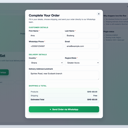
- Product-page “Order on WhatsApp” button and quick order modal.
- Customer name, phone, email, country, region, address, quantity, and shipping fields.
- Shipping-aware order estimates that follow WooCommerce shipping setup.
- Team routing modes: single, round robin, and region/state routing.
- Free-shipping area controls driven by WooCommerce country/state settings.
- Google Analytics compatible tracking (
gtagand/ordataLayer). - Thank-you page WhatsApp handoff link.
- Admin dashboard snapshot for WhatsApp order activity.
Good fit for:
- Fashion, beauty, food, grocery, pharmacy, and local retail stores.
- Stores that confirm availability, delivery fees, or payment manually before dispatch.
- Stores that use WhatsApp as the main sales conversation channel.
- Cash-on-delivery, bank transfer, mobile money, local pickup, and assisted checkout flows.
- Teams that need to route orders to different WhatsApp numbers by region or rotation.
Why use this instead of a normal WhatsApp chat button?
- A normal chat button starts a conversation but does not structure the order.
- Instant Chat Checkout collects customer and delivery details before the WhatsApp handoff.
- The plugin creates a WooCommerce order, so store admins can still track order status, totals, and customer details.
- The WhatsApp message includes the order summary, customer details, and destination number.
This plugin is distributed under GPLv2 or later.
Quick Setup
- Install and activate WooCommerce.
- Install and activate Instant Chat Checkout.
- Open
WooCommerce > Settings > Payments > WhatsApp Order. - Enable the WhatsApp Order gateway.
- Enter your WhatsApp number in international format, for example
233501234567. - Save settings and test a simple product order.
- Optional: configure team routing, free-shipping areas, button text, analytics, and thank-you page behavior.
Yes. Product-page WhatsApp orders and checkout gateway orders create normal WooCommerce orders so you can manage them from the WooCommerce admin.
Yes. The plugin is useful for cash on delivery, mobile money, bank transfer, local pickup, and manual confirmation workflows where the sales conversation continues on WhatsApp.
Yes. The plugin can show an “Order on WhatsApp” button on WooCommerce product pages. The button opens a quick order modal before sending the customer to WhatsApp.
Yes. Instant Chat Checkout adds a WhatsApp Order payment gateway, so it can work alongside your existing WooCommerce payment methods.
Yes. Use Team Routing with Round robin or Region mode, then add one teammate per line in Team Numbers.
Yes. Use single-number routing and enter your main WhatsApp destination number.
Yes. Enable Analytics Tracking in settings to send events to GA4-compatible gtag and/or dataLayer.
No. Instant Chat Checkout is not affiliated with, endorsed by, or sponsored by WhatsApp or Meta. It creates WooCommerce order details and opens the customer’s WhatsApp handoff link.
After approval, use your plugin page (including Advanced View) on WordPress.org for public stats and download history.
Categories
Plugin details
Tags on WordPress.org
Alternatives
Other plugins in the same categories.
Checkout Field Editor (Checkout Manager) for WooCommerce

Fluid Checkout for WooCommerce – Lite

Wallet for WooCommerce


YayPricing – WooCommerce Dynamic Pricing & Discounts
