

Variation Price Display Range for WooCommerce
Adds lots of advanced options to control how you display the price for your WooCommerce variable products.
5.0
(43 ratings)Will this break my store?
What the WordPress.org registry says about keeping Variation Price Display Range for WooCommerce running.
Tested to 7.0.7 — 1 branch behind 7.1
Tested against the WordPress branch in use today.5 months ago
At least 7.8 releases a year since launch. WordPress.org only lists versions still available for download, so the real number may be higher.7.2
Your host must be running at least this version.5.8
1
A single maintainer. Worth knowing if the plugin is load-bearing for your store.Maintenance & trust
Scored on how Variation Price Display Range for WooCommerce is looked after — not on how many stores run it.
99
out of 100Maintenance
35 / 35WordPress compatibility
20 / 20Support responsiveness
Not enough dataMerchant satisfaction
14 / 15Listing transparency
10 / 10Ratings
5.0
43 ratingsVariation Price Display Range for WooCommerce plugin lets you change the price format displayed on both the shop and single product pages for WooCommerce variable products.
By default, WooCommerce displays a price range from the lowest to the highest price. The price range looks like this:- $49 – $99 under the product title. To be fair, this can create confusion.
Displaying the default WooCommerce variable product price range can lead your customers to ponder which amount they will pay. Fortunately, you can change the price range for variable products with this WooCommerce extension.
Variation Price Display Range for WooCommerce comes with multiple price formats. With this WooCommerce plugin, you can display the lowest variation price replacing the default price range. Once you install and activate the plugin, the price will change to the lowest price. On top of that, the string “From” will be added before the price.
Instead of showing the default price range ($49 – $99), you can choose to show “From $49”, or “Upto $99”. Additionally, there are two more price formats to choose from.
WooCommerce Variation Price Display Range plugin helps you display the variable products in a friendlier way. You will love the price formats and other well thought options of this WooCommerce show lowest variation price plugin.
Variation Price Display for WooCommerce now supports WooCommerce Grouped products.
Like the WooCommerce Variable Products, would you love to remove the default price range for your grouped products? Now, you can apply the same price customizations for your grouped products too.
Documentation | Support | Pro Version
Excellent Features of this plugin
🥳 Different variation price display formats
The Variation Price Display plugin lets WooCommece store owners complete flexibility in displaying variable prices.
🥳 Display Highest or Maximum price
You might want to display the maximum price instead of a price range. This plugin lets you display only the highest or maximum price for variable products.
🥳 Display Lowest or Minimum Price
This plugin also lets you show only the cheapest or lowest price in WooCommerce variable products, which means you can avoid the price separator.
🥳 Show Maximum to Minimum Price
Sometimes, the lowest price could be a sample price rather than the actual price. You can use this plugin to show the maximum to the minimum price in that scenario.
🥳 Show Minimum to Maximum Price
It’s a default feature of WooCommece. Still, we have included it in our plugin settings so that you do not have to face any difficulty finding this feature.
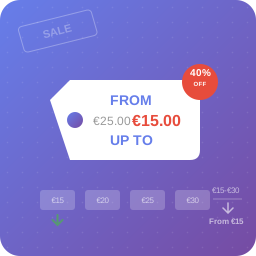
🥳 Show “From” before the minimum price
Instead of the default price range separator, you can use wording like ‘From $49’. Your customers will get a clear view of the product from it.
🥳 Show “Up To” before the maximum price.
This plugin can show the price, indicating that lower price options are also available. For example, you can show it as ‘Up to $99’.
🥳 Change price by selecting variation from the dropdown
Instead of displaying a barely visible price somewhere below the description, it’s better to update the main price with the selected variation’s price.
🥳 Hide default variation price
By default, WooCommerce displays product variation prices in a separator that lists the lowest to the highest price. However, the plugin lets you choose from different options.
🥳 Remove clear link
WooCommerce Product Range Display plugin lets you hide or remove the clear link when you select a variation. Incase you want to show the clear button, you’ll find the option on the plugin settings.
🥳 Format Sale Price
Display crossed regular pice beside the sale price. Attract your customer and let them know about this on-sale product.
Advanced features of the Variation Price Display plugin
✔️✔️✔️ GET THE ADVANCED VERSION
🔥 Advanced Price Types
By enabling the premium version, you will get two more price types. Such as- List all variation price and Custom. You can display minimum and maximum price in any format if you select Custom. List all variation price will display all the prices of each variation.
🔥 Price Comparison
While displaying the minimum price, show price comparison by displaying the additional cost relative to the minimum price.
🔥 Price Display Condition
You can define where you want to apply price display conditions. Price can be displayed on Shop/ Archive page, Single product/ Product description page, or Both Shop and Single product page.
🔥 Include/Exclude Categories
Disable price range for specific product categories by excluding categories from plugin settings page. Also, you can include categories to apply price options for specific categories.
🔥 Display Discount Badge
This option is particularly useful when you want to sell product variations at different prices or offer a discount on specific variations. It’ll show a discounted badge when the feature is enabled.
🔥 Variation discount badge(Beta)
This feature automatically displays a badge when customers select a specific product variation combination.
🔥 Editable Discount Badge Text and Style
You can fully customize the discount text to fit your shop’s needs. The badge background color and text color are also adjustable for a perfect match with your store design.
🔥 Enable / Disable Price for Admin
By enabling this option, Variation Price Display will be disabled for the admin. This feature makes it easier for admin to view the actual product price range on the shop page.
🔥 Disable Product Name
This option will remove the main product name when you enable the List all variation price from the Price Types option.
🔥 SKU with Variation Name
Moreover, the Price Range Display plugin comes with the option to enable to display SKU if the price type is: ‘List all variation price’.
🔥 Support for WooCommerce Grouped Products
All price customization options are available for WooCommerce grouped products.
🔥 Reverse Format Sale Price
Display crossed regular pice after the sale price. Attract your customer and let them know the present price before the regular price.
🔥 Animation Speed
Control the animation speed of the price-changing effect after selecting the variation dropdown(s).
🔥 Hide Price
Disable the price until the selection of variation dropdown(s). After selecting the variation dropdown(s) the price will appear.
Try Addons for Elementor & WooCommerce
Our Popular Addons for WooCommerce
👉 Fast Cart for WooCommerce
👉 Product Variation Table for WooCommerce – PVT
👉 Social Share for WooCommerce
👉 VariationX – Variations as Radio Buttons for WooCommerce
Variation Price Display Range for WooCommerce replaces the default Variation price range in both shop and single product page. You can show Minimum Price, Maximum Price, Minimum to Maximum Price, Maximum to Minimum Price.
Yes, price can be changed by change variaitons from dropdown (on single product page).
Categories
Plugin details
Tags on WordPress.org
Alternatives
Other plugins in the same categories.
YayPricing – WooCommerce Dynamic Pricing & Discounts

Wholesale Suite – B2B, Dynamic Pricing & WooCommerce Wholesale Prices

Discount Rules and Dynamic Pricing for WooCommerce

Tiered Pricing Table for WooCommerce
Show only lowest prices in variable products for WooCommerce
